The gap
Simple save code writes straight over the only copy of the player's progress, cannot tell a damaged file from a good one, and breaks old saves as soon as the data classes change.

Game dev tools
Old saves cannot break silently: keep real saves from each release as fixtures and every build must open them exactly as recorded. Plus versioned slots, atomic writes, checksums, backups, migrations, AES. Unity editor not run; core tested with .NET.
Coming soon
Not published on its store yet, so there is no buy or download link. PN Scripts does not take payment for it here.

The gap
Simple save code writes straight over the only copy of the player's progress, cannot tell a damaged file from a good one, and breaks old saves as soon as the data classes change.
What it is
Stashwright keeps real save files from every release as fixtures with the result each must load as, and fails the build when an old save breaks, loads differently, has a migration gap or has no fixture, on top of atomic writes, checksums, backups and migrations.
How you use it
You find out before release, not from players, that an update broke an old save, and you can change your save data without guessing.
A compact, source-included save layer for Unity developers who want crash-safe, versioned saves without adopting a large data framework.
Use it when
Built for
Keep a real save of every version you shipped in a fixture folder, with a file that records what it must load as. One test loads them all with your current code and options and fails with a readable report when an old save no longer loads, loads differently (for example wallet.gold: 50 -> 0 after a broken migration), has no fixture for a shipped version, or has no migration step to the next version. Fixtures are checked with backups off, are never replaced silently, and an intended change must be accepted explicitly.
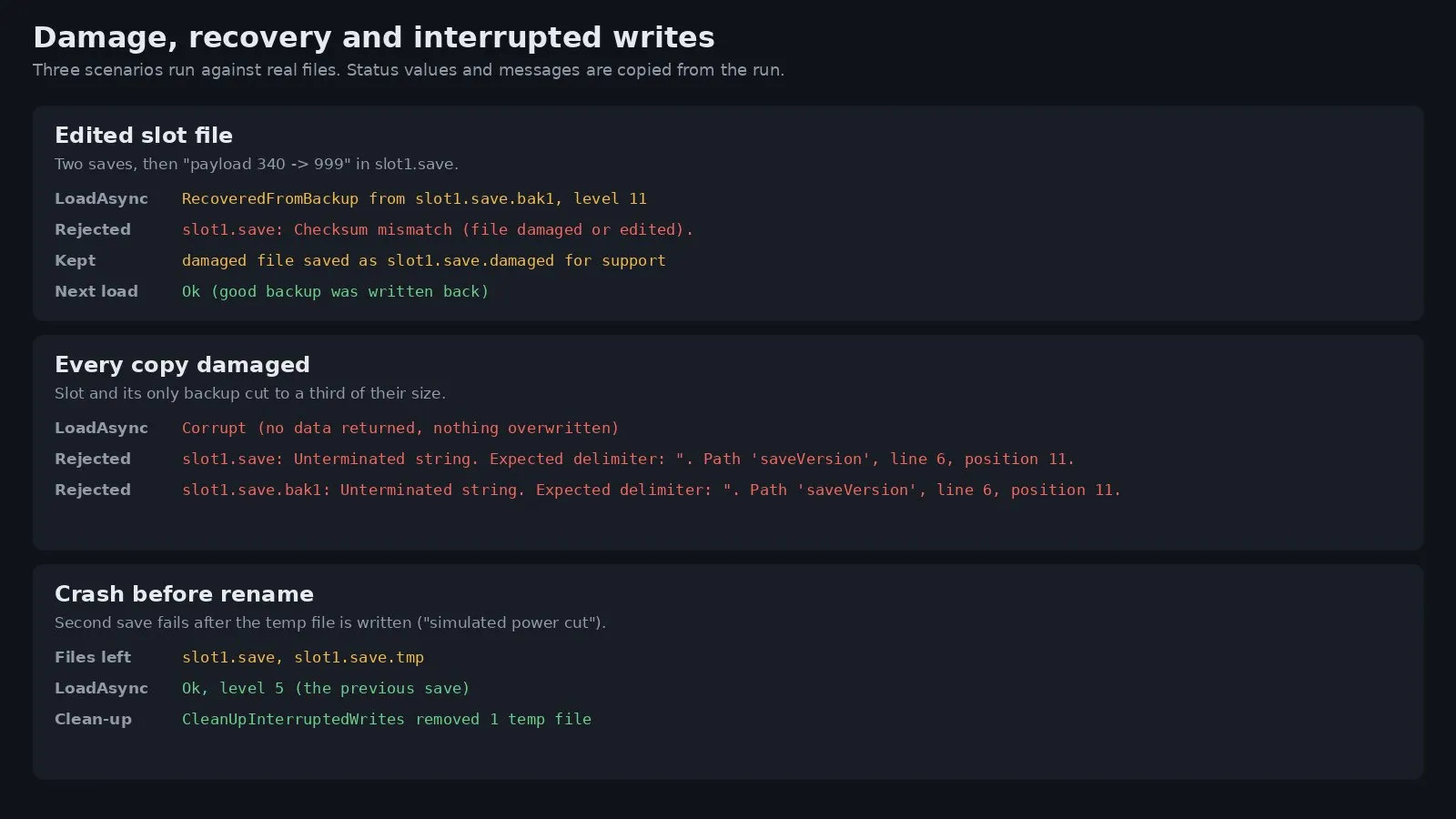
Each slot is one JSON file with a format marker, the slot name, the save version, a UTC time, a sequence number, your metadata (area, level, playtime), a SHA-256 checksum and the payload. ListSlotsAsync reads only these headers, newest first, so a load menu can show every slot without loading or decrypting the data. SaveAsync writes to slot.save.tmp, flushes it to the physical disk and renames it over the slot. Before that, the current file is copied to slot.save.bak1 and older backups move down to the configured count. A write interrupted before the rename leaves the old save in place, and CleanUpInterruptedWrites removes the leftover temp file.
Loading checks the envelope, the slot name, the checksum and, for encrypted saves, the HMAC. A rejected file is reported with its reason, the newest good backup is used and written back as the slot, and the result says RecoveredFromBackup. If every copy is bad the result is Corrupt and nothing is overwritten.
Raise the save version when your data changes and register one migration per step; each receives the raw JSON and returns the upgraded JSON, and the result reports the path, for example 1, 2, 3. Encryption is optional: AES-256-CBC with a fresh salt and IV per save, HMAC-SHA256 over the ciphertext, and keys from your passphrase with PBKDF2-SHA256. It stops casual editing; a key inside a build can be extracted.

This file could not be loaded.

This file could not be loaded.

This file could not be loaded.
This file could not be loaded.

This file could not be loaded.

This file could not be loaded.
1 of 6
| Platform or runtime | Supported versions | Tested up to |
|---|---|---|
| .NET (core library) | netstandard2.1 or newer | .NET 8.0 |
| Unity | 2021.3 or newer | compiled against 6000.5.4, not run |
It is finished and tested. It is not on sale yet; this page will say where to get it when it is.
Coming soon
Not published on its store yet, so there is no buy or download link. PN Scripts does not take payment for it here.